


PackLib Help
This documentation accompanies PackLib, the library of parametric packaging and POS display templates published by TreeDiM. It opens from within the software and brings together getting started, detailed tutorials and answers to the most common questions.
- Tutorials The interface, the libraries, Smart Assembly, parametric design and network synchronisation.
- Frequently asked questions Licence, database, exports, 3D preview and common issues.
- Services Custom templates, conversion of your existing drawings, training and post-processor tuning.
- Contact Reach TreeDiM support, and what to include so we can help quickly.
Getting started
At start-up the main window is made of three areas: the toolbar at the top; the tree of libraries on the left; the main window, which displays the contents of the selected folder.
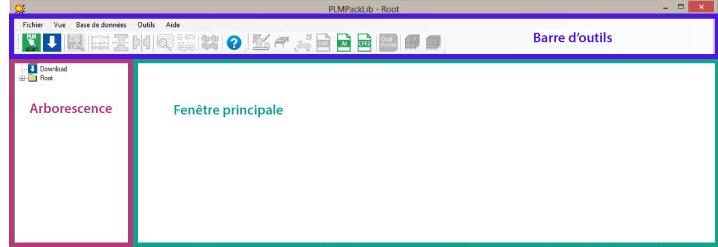
- Open the tree by clicking the green start button, or directly on Root in the tree.
- Browse the libraries, either through the tree on the left or by clicking the thumbnails in the main window.
- Select a template: its parameters appear on the right, and you can resize it, preview it in 3D, then export it.
Each step is detailed in the How the interface works tutorial.
What the library contains
The content shipped with PackLib is sorted by family:
- FEFCO — the corrugated board packaging standards (series 0200 to 0900).
- ECMA — the folding carton standards.
- Smart Assembly — templates built by assembling components (see the tutorial).
- Themed libraries — packaging, displays and POS, trays, wraps, re-board, furniture, office accessories, labels.
- Plugin Components and Cardboard profiles — your own parametric components and the material profiles used by the calculations.
Further libraries can be downloaded from the dedicated page inside the software: see Downloading new libraries. You can also create your own parametric templates and add them to the tree.
Where to find what
The most useful functions and where they live in the software:
| To… | Menu |
|---|---|
| Come back to this documentation | Help → Online Help, or View → Start page |
| Open the library download page | View → Download page |
| Open a second view on the tree | View → New browser |
| Back up, restore or move the library | Database |
| Edit cardboard profiles and formats | Tools → Edit profiles / Edit cardboard formats |
| Change the settings, including showing this page at start-up | Tools → Settings |
| Check the installed version | Help → About… |
| Enter or check the licence | Help → Manage license… |
| Read what changed in this version | Help → Display README file |
That is the default behaviour since version 11.0.9515. Open it again with View → Start page, or switch the automatic display back on in Tools → Settings, option Show start page at startup.
More about PackLib
The commercial presentation of the software, its features and subscription terms are published on the TreeDiM website: